Googlebooks go on sale in Australia on 5 October from $2,299, but Google says they aren't ready for business fleets yet
Googlebook laptops from ASUS, Dell, HP and Lenovo arrive on 5 October from $2,299. Google says business management tools start in the second half of 2027.
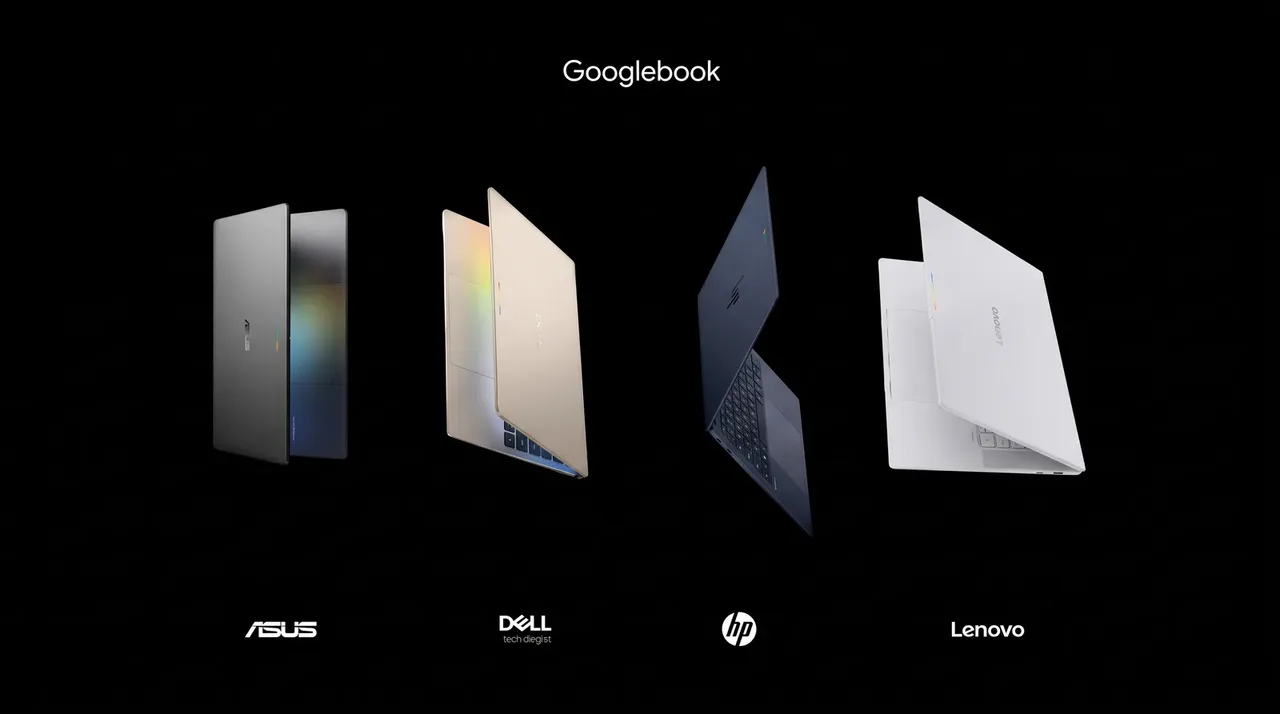
Google’s new Googlebook laptops go on sale in Australia on 5 October. Google Australia says the first models come from ASUS, Dell, HP and Lenovo, “starting at $2,299 RRP”, and describes Googlebook as “a new category of laptops designed for the way we work today”.
For a small business, the more important detail is in Google’s FAQ for IT administrators: “The 2026 Googlebook launch is designed specifically for personal consumer use and does not yet support domain enrollment or centralized fleet management.” Google says management tools start rolling out in the second half of 2027.
What’s on sale
Googlebook OS is built on Android, with the desktop features of ChromeOS and Google’s Gemini AI built in. Google’s Australian shop lists four models, and each product page marks them “Coming Soon” with prices “based on RRP”:
| Model | From (RRP) | Processor | Screen | Weight |
|---|---|---|---|---|
| HP Googlebook 14 | $2,299 | Snapdragon X Elite | 14-inch 2.8K OLED touch | 1.22 kg |
| Lenovo Googlebook 15 | $2,299 | Intel Core Ultra 5 | 15.3-inch 2.8K OLED touch | 1.29 kg |
| Dell XPS Googlebook | $2,399 | Snapdragon X Elite | 13.4-inch 2.5K LCD touch | 1.09 kg |
| ASUS Googlebook 14 | $2,799 | Intel Core Ultra 5 or Ultra 7 | 14-inch 3K OLED touch | 1.00 kg |
Higher configurations cost more: up to $2,999 for the HP and ASUS models, $2,699 for the Dell and $2,399 for the Lenovo, on Google’s product pages. Google lists battery life of up to 13 to 19 hours depending on the model, based on controlled web browsing tests, and says actual battery life may be lower.
Google says the laptops link closely with Android phones: you can continue a task from your phone, open phone files, and stream phone apps to a window on the laptop (Google says this needs a phone running Android 17 or later). Gemini features include Magic Pointer, which brings Gemini into whatever you’re working on, and Rambler, which turns “spoken thoughts into organised, ready-to-share writing”. Google promises “regular feature drops and updates for up to 10 years from launch”.
The catch for businesses
On our reading, at this price Googlebooks compete with business laptops and MacBooks, not budget Chromebooks. But Google’s admin FAQ is clear that the first models are for individuals.
What doesn’t work yet. A business can’t enrol a Googlebook in its domain or manage a fleet of them centrally. Google says “a comprehensive management experience for Googlebooks will start rolling out in the second half of 2027”, as part of “a multi-year journey that will roll out in phases”. On our reading, that means an office can’t yet push device settings, apps or security policies to Googlebooks, or wipe a lost one, the way it can with managed Chromebooks, Windows PCs or Macs.
What does work. Google says staff “can sign in with managed Google Workspace accounts (if permitted by domain administrators via Google Endpoint Management)”. Users can also opt in to cloud-based Chrome browser management, which Google says covers the most common browser policies.
Licensing is still open. Chrome Enterprise Upgrade licences stay valid for Chromebooks. Google says that for new Googlebooks, “management will operate under a new licensing structure”, with details to come.
Office files. Google’s consumer FAQ says you can open, edit and save Word, Excel, Outlook and PowerPoint files using the Microsoft 365 app, with more features on a Microsoft 365 subscription.
The free Google AI Pro year
Eligible buyers who are new Google AI Pro subscribers get 12 months of Google AI Pro (exclusions apply), which includes 5TB of cloud storage. Google’s shop page says the offer is for Australian residents aged 18 or over, for a Googlebook bought and activated on or after 1 October 2026, and that it then charges A$32.99 a month, or the then-current price, unless cancelled. The offer terms say it must be redeemed by 31 March 2027 (US Pacific time) and needs a payment method. The terms don’t say whether it works on a Workspace business account. On our reading, because it’s a Google One offer, it’s aimed at personal accounts, but Google doesn’t say so. Watch where business files end up: we covered the same personal-versus-work account question when Adobe’s tools arrived in Gemini.
If you already use Chromebooks
Nothing changes yet. Google says it will keep supporting current Chromebooks under its Auto Update policy, and “ChromeOS devices will continue to receive regular updates and security patches through mid-2034”. It says “many newer commercial Chromebook models will be capable of upgrading to Googlebook OS”, with eligibility details “at a later date”.
What it means for a small business
On our reading, a Googlebook can make sense now as a personal machine for an owner who lives in Android and Google Workspace, as long as the Workspace admin allows the sign-in. For laptops the business needs to control, such as staff machines holding client data, Google’s timeline means waiting for the management tools in the second half of 2027, or buying something you can manage today. If you’re weighing a Mac instead, see our Mac mini M6 buying guide.
Checklist
- Hold off on buying Googlebooks for staff. Google says management tools for Googlebooks start rolling out in the second half of 2027.
- Decide whether Workspace accounts can sign in. In Google Endpoint Management, your Workspace admin controls whether staff can use a managed Workspace account on a Googlebook.
- Check the Auto Update date of each Chromebook you own. Google keeps updating current Chromebooks until those dates or mid-2034, whichever comes first, and says many newer models can move to Googlebook OS.
- Check which Google account gets the free AI Pro year. The offer terms don’t say whether it covers Workspace accounts, so keep business files in your Workspace storage.
- Set a reminder before the free AI Pro year ends. After 12 months it costs A$32.99 a month, or the then-current price, unless you cancel.
- Try your Office files on a Googlebook before relying on it for work. Google says Word, Excel, Outlook and PowerPoint files open through the Microsoft 365 app, with more features on a Microsoft 365 subscription.
Tick items as you go. Your ticks stay in this browser.